
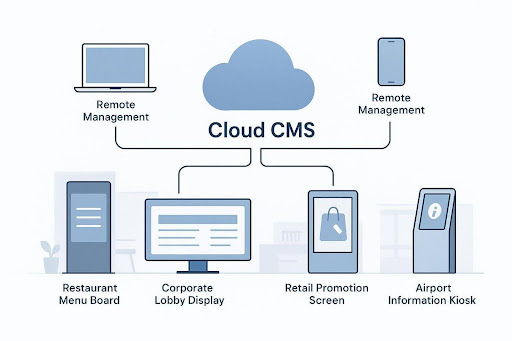
Cloud-based digital signage is changing how companies share messages and connect with people. It’s a system where you control screens over the internet using software, instead of relying on bulky on-site servers. With this setup, teams can create, schedule, and update content across many screens from one place, avoiding the limits of older IT setups.
In short, it makes content delivery fast, flexible, and easy to access from anywhere, so your message stays current and effective.
The move to cloud tools is a big step forward, bringing flexibility, scale, and efficiency.
This modern way of managing screens lets teams handle changing content, react quickly, and free up time for other priorities. If you want to learn more about how this can help your organization, exploring a cloud-based digital signage platform is a good place to start.
What Is Cloud-Based Digital Signage?
Cloud-based digital signage changes how visual content is delivered and managed across screen networks. The content management system (CMS) and media library live online, not on local servers. That means storage, organization, and distribution happen in the cloud, reachable through a browser.
By moving from local machines to a hosted model, users can create, schedule, and update content from almost anywhere, which makes the system quick to use and easy to scale.
This is very different from older on-site systems that tied content control to a physical location. With the cloud, teams remove distance barriers and simplify daily work. It keeps information flowing smoothly to every screen-whether you have a few displays in one building or thousands worldwide-all under one easy-to-manage setup.
How Does Cloud-Based Digital Signage Work?
The setup is simple and effective. It usually includes three parts: a web CMS, media players, and the screens.
- CMS: the online dashboard where you upload media, build layouts, and set schedules.
- Media players: small devices that receive content from the cloud and play it.
- Displays: TVs, monitors, or kiosks that show the content.
After you prepare content in the CMS, it’s sent over the internet to each media player, which then shows it on the screen. Updates happen fast, so changes in the CMS appear on connected displays almost right away. You don’t need to visit the screen in person to make edits.
| Component | Main role |
| Web CMS | Create, organize, and schedule content |
| Media Player | Download content and play it on the screen |
| Display | Show the final visuals to viewers |
Key Benefits of Cloud-Based Digital Signage
Cloud signage brings clear gains for cost, speed, and scale. It helps teams communicate faster, across more places, with less manual work. Many pain points of older systems fade away, making cloud a smart pick for most organizations.
These wins span daily operations and long-term plans. Moving from on-site hurdles to a hosted model gives you a clear edge in a fast-moving digital market.
Reduced Upfront and Maintenance Costs
Cloud platforms, such as Look Digital Signage, lower both upfront and ongoing costs. You don’t need to buy servers, install heavy software, or pay for big hardware refreshes. The SaaS model replaces large capital spending with a steady monthly or annual fee, which makes budgets easier to plan.
The provider handles software updates, security patches, and maintenance. That cuts IT workload and removes the need for manual updates and extra storage, which adds up to long-term savings.
Scalability for Networks of Any Size
Whether you have one site or thousands, cloud makes it easy to grow or shrink your network. Adding screens is as simple as registering them in the CMS and assigning content-no extra server installs or complex cloning needed.
This flexibility supports fast changes, like opening new stores or adding event screens. The platform handles more demand without major rebuilds, keeping growth smooth and cost-effective.
Rapid Deployment and Onboarding
Setup is fast. Instead of waiting weeks for on-site installs, cloud screens can be online in minutes. That helps teams roll out campaigns across many locations quickly and respond to urgent needs without delay.
Most platforms are easy to learn, with clear interfaces that cut training time. Non-IT users can build layouts, schedule items, and manage screens right away, so your team gets value faster and can focus on content quality.
Global Accessibility and Flexibility
Because it lives online, your team can manage the network from anywhere. This is helpful for global companies and remote teams that need to work together in real time.
You can localize content for each site while keeping brand standards the same, or send emergency messages across all screens in one action. Manage your network anytime to keep messages current and aligned with your goals.
Use Cases: Where Cloud-Based Digital Signage Delivers Most Value
Cloud signage is flexible and fits many industries. Remote control and quick updates help solve unique messaging needs and improve day-to-day work across different settings. From retail to healthcare, it delivers timely, targeted messages where they matter most.
Below are common examples showing how teams apply this tech to improve communication, boost experiences, and meet specific goals.
Retail Chains and Point-Of-Sale Environments
Retailers use cloud signage to promote products, run offers, and keep consistent branding across many stores. From one dashboard, staff can change prices, feature new items, or launch limited-time deals right away.
Consistency holds across locations, even with different traffic or regional promos. At checkout, screens can drive impulse buys with dynamic offers. Elsewhere in the store, they can share product details, reviews, or wayfinding. Fast updates keep messages relevant and improve the in-store experience.
Quick-Service Restaurants and Menu Boards
QSRs rely on digital menu boards for quick changes to items, pricing, and nutrition info. Time-based menus switch automatically-breakfast to lunch, or happy hour starting at a set time-without staff steps.
Beyond menus, screens can show food images, promos, and loyalty content. Central control keeps info current across franchises, helping both speed and consistency across many locations.
Healthcare Facilities and Patient Engagement
Healthcare screens improve the patient journey, daily flow, and access to important information. Displays can guide visitors, show queue updates, and share health education. In busy check-in areas, current content can reduce frustration and help lines move.
A cloud CMS lets central teams manage screens across hospitals and clinics without being on site. Schedules, wait times, and public health messages stay accurate. During emergencies, messages can go live everywhere at once to improve safety.




Recent Comments